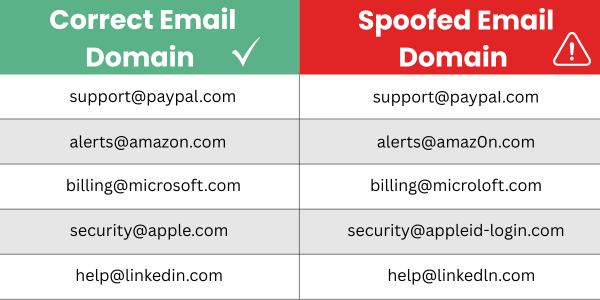
Updated June 2026 Every employee has experienced that moment. An email lands in your inbox, something about it feels a little off, and hopefully you pause before clicking. Is that my bank? Is Microsoft trying to get ahold of me? Does this person work at my company? You are not imagining things. Scam emails have become much more sophisticated than they used to be. The old clues like bad grammar and weird formatting are disappearing, partly because scammers now use AI to write their messages. A recent scam email can look almost identical to a real one from your bank, a vendor, or even someone inside your own company. The good news is that most scam emails still share a few common patterns. Once you know what to look for, you can spot one in under a minute. This guide walks you through the seven most common red flags according to uSecure, explains why each one matters, and tells you exactly what to do if you think you received a scam email. Phishing, which is the technical term for scam emails designed to steal information, is still the number one cause of cybersecurity attacks on small and mid-sized businesses. Most small businesses think they will never be targeted. The assumption is that scammers would rather go after big companies, but that is hardly the case. In reality, the smaller the business, the fewer defenses they usually have in place, which makes them easier and more attractive targets. Roughly 1 in 3 scam emails slip past standard spam filters and land directly in employee inboxes. When that happens, the last line of defense is a person noticing something looks wrong. One wrong click can hand over a password, link a bank account, expose customer data, or install ransomware across your entire network. Recovery is expensive. It can mean weeks of downtime, thousands of dollars in lost productivity, but most importantly long-term damage to customer trust. A few minutes spent training your eye to spot these signs is one of the highest return investments your business can make. (Save this graphic as a quick reference for spotting phishing emails.) Strange grammar, awkward phrasing, or odd word choices are classic signs of a scam email. Sometimes the writer is just careless, but often the bad writing is intentional. Scammers use clumsy writing as a filter. They want to waste their time only on people who overlook small issues, because those same people are more likely to overlook bigger problems later in the scam. That said, AI has made this red flag less reliable than it used to be. Modern scam emails are often written in perfect English. So, if the writing is bad, trust your gut. But if the writing is good, do not assume the email is safe. Attachments are one of the most common ways ransomware and viruses get onto a computer. Real companies rarely send files out of the blue, especially if you have not been in contact with them recently. If a file arrives from someone unknown, or from outside your organization, treat it as a threat until proven otherwise. When in doubt, go to the company’s website directly and log in there rather than opening the attachment. If the file is really for you, it will usually be available inside your account. No legitimate bank, vendor, or government agency asks for passwords, account numbers, or tax IDs over email. There are generally no exceptions to this rule. Yet this tactic still works, because the request is dressed up to look normal. If you ever see one of these requests, stop and verify. Call the company using a phone number from their official website, not the number listed in the email. Scammers often include fake phone numbers that lead right back to themselves. “Your account will be suspended in 24 hours.” “I need this project done by today.” Urgency is one of the oldest tricks in the book, and it still works because panic shuts down your ability to think critically. Real companies give you time to respond. So do real coworkers. If someone is rushing you, slow down instead of speeding up. Your boss would rather deal with a quick question about legitimacy than a huge cyber breach. Here are two common ways urgency is used, and we see across the internet commonly. External urgency often looks like threats from banks, shipping companies, or tax agencies. Internal urgency often looks like a quick email from a boss or coworker asking for a wire transfer, a gift card, or login credentials. Surprise refunds, bonuses, mystery rewards, or discounts you never asked about are bait. Scammers know that a free offer lowers your guard while also triggering your interest. The combination makes people click before thinking, and even tricks some into sending money to claim a bonus or reward that does not exist. A simple rule helps here. If you did not enter a contest, you did not win one. And even if you did enter something, verify directly with the organizer through a secondary channel. If you did win something, cross verifying legitimacy won’t send the prize to someone else. Scam emails usually go out to thousands of addresses at once, so they rarely use your actual name. Greetings like “Dear Customer,” “Hello Account Holder,” or “Dear Valued Member” are significant signals that the sender does not really know who you are. A real vendor, bank, or business partner almost always addresses you by name. There are exceptions, like newsletters and automated notifications, but any email asking you to act should know who you are. (especially if its asking for your personal information) This is one of the sneakiest tricks scammers use. They register email addresses that bury a real company name inside a fake domain, hoping you will glance at the sender and assume it is legitimate. A few examples of how this works: Always check the full sender address, not just the display name. Your email app shows whatever name the sender wants it to show, but the real email address is much harder to fake. Some email apps don’t show the actual address unless you dig deeper. (which is what scammer are hoping you won’t do) The same rule applies to links. Hover your mouse over any link before clicking to see where it leads. If the destination does not match the company the email claims to be from, it is a scam. The good news is that this is a very fixable problem. Most of the risk comes from settings that were simply never configured in the first place. Here are three areas worth focusing on. If an email hits any of the red flags above, here is a simple process to follow. Most businesses rely on their email provider’s built-in spam filtering to catch scams before they reach employees. That is a good first layer, but it is not the end all be all solution. Scammers are constantly testing new tactics specifically to bypass these filters, which is why roughly 1 in 3 scam emails still get through. A multi layered approach works much better. That means combining advanced email filtering with regular security awareness training for your team, periodic phishing simulation tests, and a clear process for reporting anything suspicious. This is the approach we use with all of our managed IT clients, because human awareness is the single strongest defense against scams that slip through technology. Most phishing emails that cause damage didn’t slip past a filter, they slipped past a person. MMIT helps Central Iowa businesses build the layered defense that stops phishing at every level: advanced email filtering, regular security awareness training, phishing simulation tests, and a clear reporting process for your team.
How to Tell If an Email Is a Scam: 7 Red Flags Every Business Should Know
Why Scam Emails Target Small Businesses
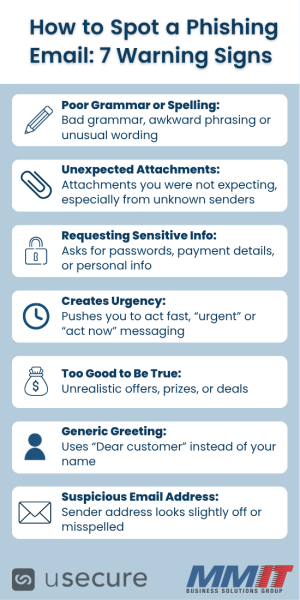
The 7 Red Flags of a Scam Email
What to Do If You Think You Received a Scam Email
Why Spam Filters Don’t Stop All Phishing Emails
Worried About Phishing Reaching Your Team?