
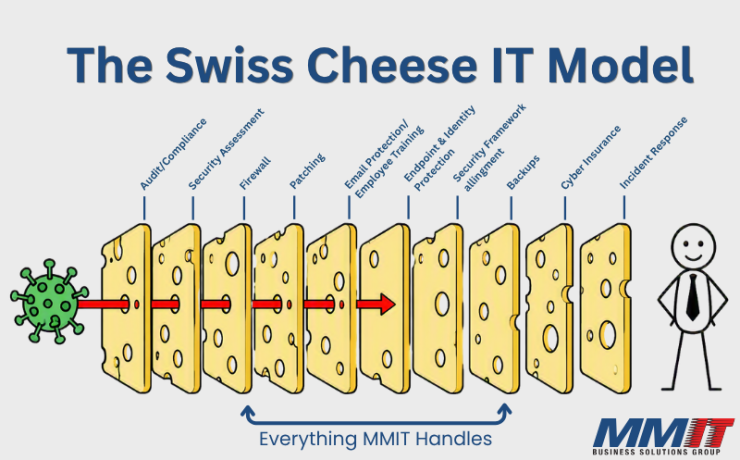
Why Your Cybersecurity Stack Looks Like a Stack of Swiss Cheese
Why Your Cybersecurity Stack Looks Like a Stack of Swiss Cheese Published on: October 19,...


Messaging protection is a layered approach to securing email before it reaches users and your network. It goes beyond basic spam filtering by inspecting messages, links, and attachments in a secure environment to identify threats before they are delivered.
Advanced messaging protection analyzes sender behavior, message context, and intent to detect phishing, impersonation, and fraudulent emails. By stopping threats early and continuously monitoring messages after delivery, businesses can reduce risk without disrupting daily work.

Understanding the difference between standard filters and modern email protection
Even with advanced email protection in place, some threats are designed to bypass technology by targeting people. Phishing and impersonation attacks rely on trust, urgency, and familiarity to trick users into taking action.
User awareness training strengthens your last line of defense by helping employees recognize suspicious emails and respond appropriately. Ongoing education, testing, and reinforcement reduce human risk and help turn employees into an active part of your security strategy.
When users are confident in what to look for and how to respond, businesses see fewer incidents, faster reporting, and stronger overall protection. Combined with advanced email security, awareness training helps create a more resilient defense against modern email threats.

91% of cyberattacks begin with a spear phishing email.
96% of executives are unable to distinguish a phishing email from a legitimate one.
30% of data breaches are caused by repeat offenders.
Sources: KnowBe4 phishing research
Security awareness training works best when it is ongoing and practical. Short, on-demand training helps employees recognize phishing and impersonation attempts and respond appropriately when something looks suspicious.
Training works best when it is reinforced through real-world testing. Regular phishing simulations give your employees a safe way to practice spotting suspicious emails and reinforce good habits over time.
When users make mistakes, follow-up training is targeted to address the specific risk. This focused reinforcement helps correct behavior quickly and reduces repeat incidents.
Instead of one-size-fits-all training, users receive guidance based on activity, helping them strengthen real weaknesses.
Email security works best when it is part of a broader managed IT security strategy. MMIT helps businesses align email protection with their overall IT environment.



















"*" indicates required fields